![frame_partymode-1.png]](https://support.giosg.com/hs-fs/hubfs/frame_partymode-1.png?height=40&name=frame_partymode-1.png)
Here’s how it works:
- Pop-up Qualification Process:
- A pop-up appears at the end of each session to help agents qualify the interaction.
- This pop-up must be completed before closing the session window if the feature is turned on.
- Two Levels of Qualification:
- First Level:
- Agents are presented with 3 mutually exclusive options:
- Sale
- No Sale
- Invalid
- Agents can select only one option from the first level.
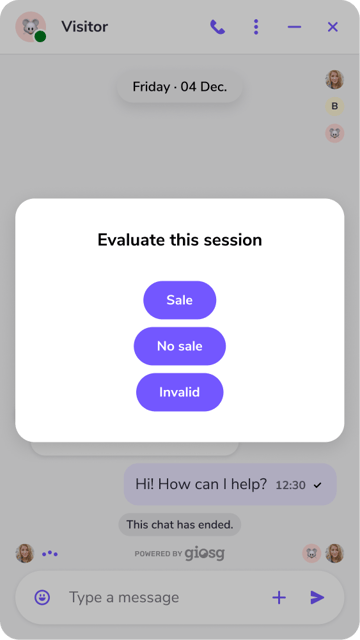
- Agents are presented with 3 mutually exclusive options:
- Second Level:
- Based on the selected option from the first level, a second pop-up with customizable options will appear.
- For example, if “Sale” is selected, the second level could include choices like:
- Monetary amount
- Internal Visitor categorization 1
- Internal Visitor categorization 2
- Sale type
- First Level:
-
-
- Agents can select multiple options in the second level, enabling more detailed qualification of the session. However, it is mandatory for Agents to choose at least one option to proceed.
- The results are officially recorded only when the Agent clicks "Submit".
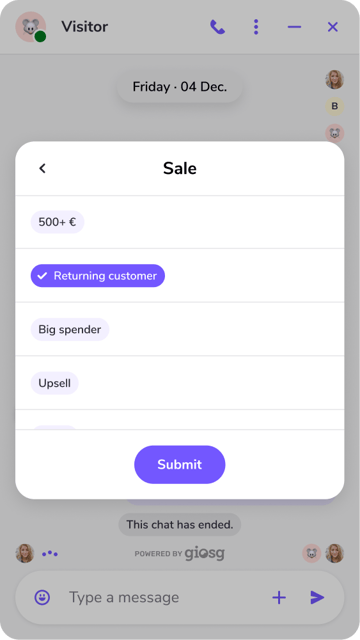
-
- Customization:
- The first level options are the same for all customers.
- The second level options are fully customizable per client, allowing each business to tailor it to their specific needs.
- Feature Setup:
- The Lead Qualifier can be turned on or off.
- If turned on, the Agents won’t be able to close the Visitor chat window without filling out the pop-up.
- If turned off, the pop-up will not appear at all.
- Currently, it cannot be enabled for selected sessions only; it's either on for all sessions or off.
- Clients need to contact the CS team to set up the feature.
- Session Compatibility:
- This feature works across all session types, including chats, virtual calls, and telephony.