![frame_partymode-1.png]](https://support.giosg.com/hs-fs/hubfs/frame_partymode-1.png?height=40&name=frame_partymode-1.png)
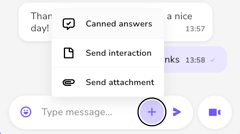
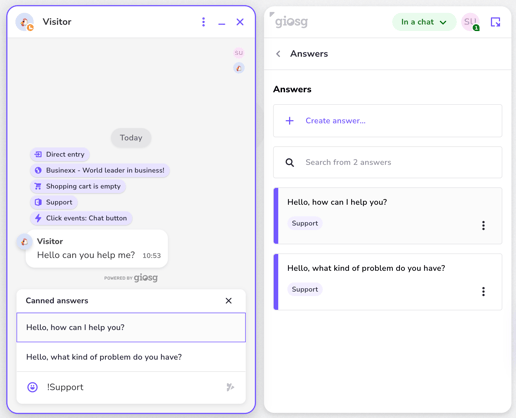
The user can select and send previously saved answers from the Canned answers menu. The menu can be quickly accessed by typing ! into the message input field, and it is also found through the + button next to it. After selecting an answer, the agent can always edit it before sending.
Managing answers
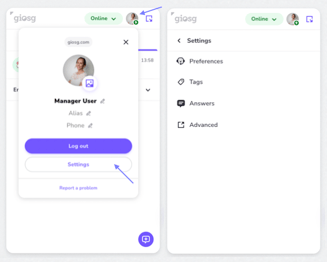
Answers can be created and edited by manager users only (users with Settings permissions, see this article for more information). The Canned answer management can be accessed by first clicking on your own profile picture, then "Settings" and "Answers".
Canned answers are room specific so that you can create more focused answers for each use case. This means that when you create an answer, you can select in which rooms the answer should be available (one, some or all).
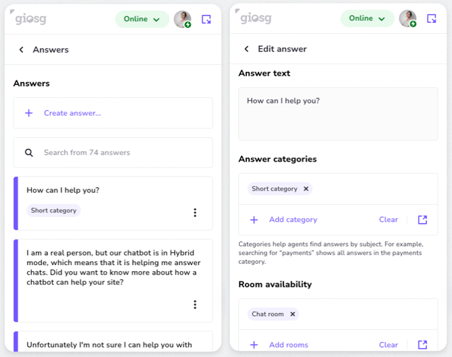
To have even more relevant canned answers for the ongoing case, categories can be added to the Canned Answers. These allow agents to search Canned Answers based on the answer contents, but also based on the category assigned to the answer. You could for example create a “billing” category, which then could be attached to all billing related canned answers.
Keen to take your canned answers to the next level and use AI-powered reply suggestions to boost productivity? Read more about this here and contact support@giosg.com for more information.