![frame_partymode-1.png]](https://support.giosg.com/hs-fs/hubfs/frame_partymode-1.png?height=40&name=frame_partymode-1.png)
Here’s how it works:
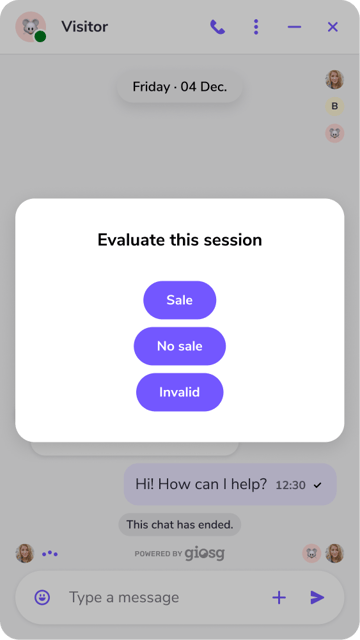
Pop-up Qualification Process:- A pop-up appears at the end of each session to help agents qualify the interaction.
- This pop-up must be completed before closing the session window if the feature is turned on.
- This feature works across all session types, including chats, virtual calls, and telephony.
Two Levels of Qualification
First Level:
- Agents are presented with 3 mutually exclusive options:
- Sale
- No Sale
- Invalid
- Agents can select only one option from the first level.
-
-
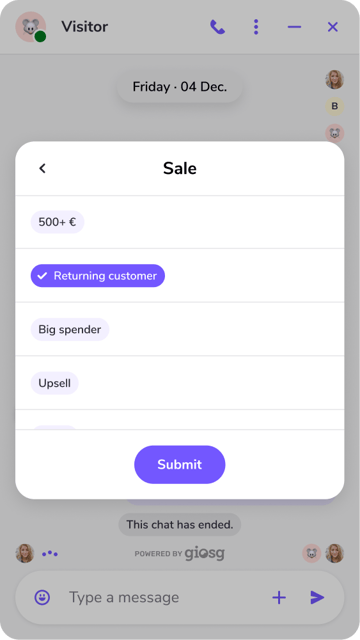
- Based on the selected option from the first level, a second pop-up with customizable options will appear.
- For example:
- If “Sale” is selected, the second level could include choices like:
- Monetary amount
- Sale type
- Product category or campaign connection
- If “Sale” is selected, the second level could include choices like:
-
-
-
-
- For "No sale" or "Invalid", you could have frequent reasons as to why no sale happened or why lead quality was poor
- Agents can select multiple options in the second level, enabling more detailed qualification of the session. However, it is mandatory for Agents to choose at least one option to proceed.
- The results are officially recorded only when the Agent clicks "Submit"
-
-
Customization
- The first level options are the same for all customers.
- The second level options are fully customizable per client, allowing each business to tailor it to their specific needs.
These can be customised by manager users (users with Settings permissions) from Settings -> Tags -> Lead qualifier.
Then select the 1st level option, after which you can define 2nd level options for it.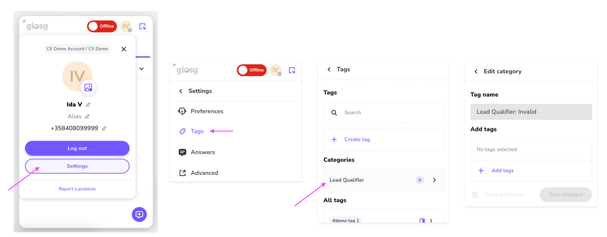
Feature Setup:
-
- The Lead Qualifier can be turned on or off.
- If turned on, the Agents won’t be able to close the Visitor chat window without filling out the pop-up.
- If turned off, the pop-up will not appear at all.
- Currently, it cannot be enabled for selected sessions only; it's either on for all sessions or off.
- The Lead Qualifier can be turned on or off.
To enable this functionality, reach out to your contact person at giosg or email support@giosg.com.